
THEO Toolbox App · Free
Get it now. Free on your phone.
Scan the code with your phone or tap a store button. No detour.

Or scan with your phone
What’s in the toolbox
You’re never alone with your new machine
Proven recipes
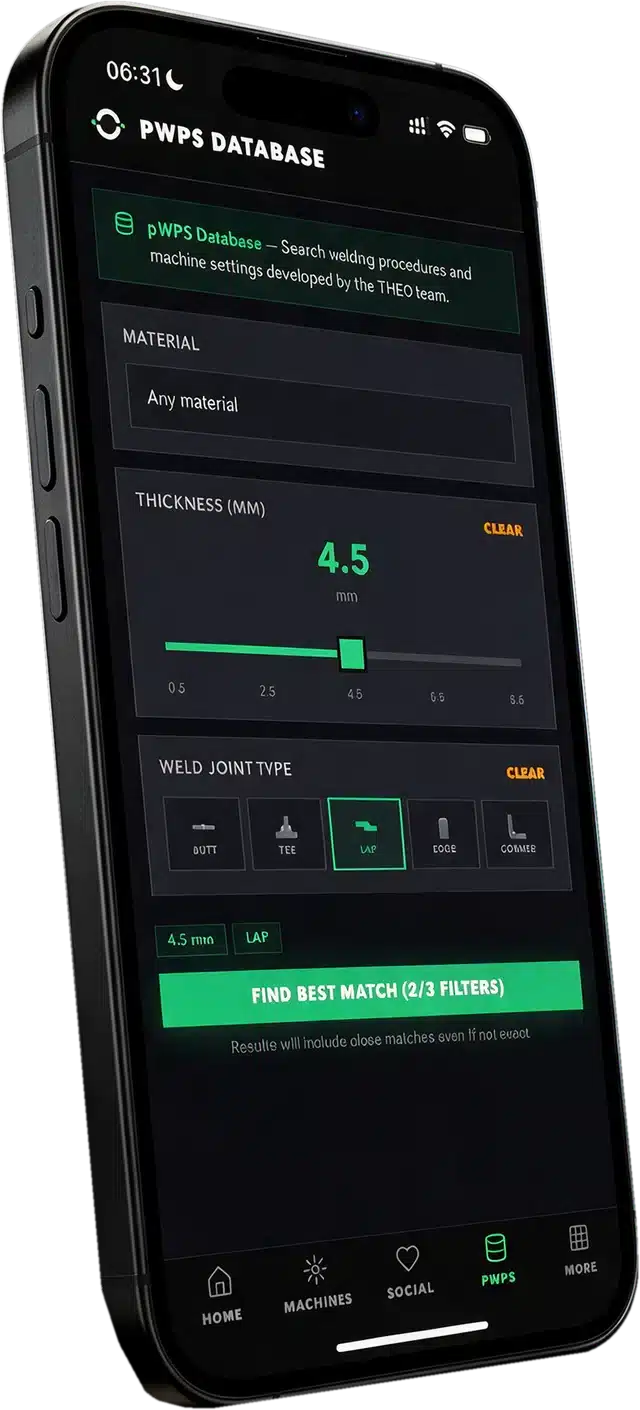
Start from welding parameters that work. Joint, material, thickness: three taps to a procedure.
Your machines
Codes, warranty, service history and documents for one machine or a fleet of 100.
THEO AI
A laser welding expert in your pocket, around the clock, in your language.
THEO Academy
Courses from the basics to advanced technique, with safety certification.
Community
Welders answering welders. Show your work, rate welds, ask the shop.
Built for companies
Machines belong to the company, not to one phone. Invite your team and track certifications.
The recipe book
Three taps from question to parameter set
New to laser welding? Most Toolbox users are. So the app starts where every job starts: with the settings.
Pick the joint, the material and the thickness, and get a complete welding procedure developed and validated by THEO’s Applications Team. No trial and error. You start from a recipe, not from scratch.
- Joint types as icons: butt, tee, lap, edge, corner
- Steel, stainless, aluminium, titanium, nickel, copper
- A thickness slider with results as you move it
- Qualification records behind the procedures
- A library that keeps growing after you bought the machine
Basic recipes are free for everyone. The full recipes come with every registered THEO.

Your machines
Your whole fleet in your pocket
Scan the QR code on the machine or type its serial number. It is registered in under a minute, and the warranty starts right there. No paperwork.
- One machine or a hundred in one searchable view
- Model, serial number, specs, firmware and status per machine
- Machine codes always at hand, day and night
- A warranty bar with the exact coverage dates
- Proof of purchase, machine files and resources in one place
- Authorized operators per machine
- A clean ownership handover when you sell a machine
It is the binder that never gets lost.

Service and THEO AI
Help that already knows what’s on your bench
Ask THEO AI about a machine and it knows the model and the setup. No explaining. Attach a photo of the weld or the problem and get an answer in your language. No queue, no office hours.
When something needs fixing, send a service ticket from the machine’s screen. The serial number is attached for you, and you see where your ticket stands from submission to resolution. No black hole.

THEO Academy
From first weld to certified pro
THEO Academy opens inside the app with one tap, no second login. Courses run from the basics to advanced technique and include safety certification. Finish the safety course and it unlocks your machine’s permanent codes.
Help articles and the THEO blog are in the app too, and your certifications show as progress and badges.

Community
Show your work. Learn from people who weld the same stuff.
Post photos and videos of your welds with material, joint and machine. See what good looks like and which work THEO picked out.
Rate welds from the field, five minutes at lunch, and put up your own for honest feedback. Got a problem? Ask it as a question and mark the answer that solved it.

For companies
The machine doesn’t walk out the door with an employee
In the app a machine belongs to your company, not to one person’s phone. Find or create your company at sign-up. An account manager invites people, approves requests and removes those who leave, and keeps track of every user’s certifications.
For THEO Partners and Enterprise customers
There is a second cockpit: Toolbox Enterprise
The app is one half of the platform. Toolbox Enterprise is the other: a web cockpit for THEO Partners and Enterprise customers. Same platform, same data, a view of every machine, customer and service case you look after.
It also keeps each machine’s qualification record, with beam data and calibration, and takes your requests to THEO’s Applications Lab for welding recipes made to order.
Want to see it? Talk to us.
With and without a THEO
What you get
| Without a THEO | With a registered THEO | |
|---|---|---|
| THEO AI | Yes | Yes |
| THEO Academy courses | Yes | Yes |
| Community | Yes | Yes |
| Basic welding recipes | Yes | Yes |
| Full welding recipes | – | Yes |
| Your machine’s codes, documents and warranty status | – | Yes |
| Service tickets with live status | – | Yes |
| Operators and ownership transfer | – | Yes |
Get started
Three steps, a few minutes
2. Create your account
With your email address, or sign in with Apple or Google.
3. Scan your machine
Point the camera at the QR code on your THEO, or type the serial number.
The details
THEO Toolbox App
- Price
- Free, no in-app purchases
- iPhone
- iOS 15.1 or later
- Android
- On Google Play
- Languages
- 9: English, Dutch, French, German, Italian, Japanese, Polish, Portuguese, Spanish
- Account
- Free THEO account
- Works with
- MA1 Series, TM-300, THEO wire feeders
- Made by
- THEO Laser Inc.
What welders say
“Finally, a place for the whole laser welding community.”
Marco ReyesFabrication Lead, Apex Metalworks
“THEO AI is the first AI that is actually useful for welders. I don’t need to look up any manuals; it’s all there.”
Dana WhitfieldOwner, Whitfield Custom
Good to know
Questions about the app
Is the app really free?
Yes. The download is free and there are no in-app purchases.
Do I need a THEO to use it?
No. Basic welding recipes, THEO AI, the training and the community are open to everyone. With a registered THEO you also get the full welding recipes, your machine’s codes, documents, warranty status and service tickets.
Which phones does it run on?
iPhones with iOS 15.1 or later and Android phones. There is no iPad version.
Does the app control my welder?
No. The app does not connect to the machine. You read the recipe in the app and set the parameters on the machine.
How do I register my machine?
Open the app, scan the QR code on the machine or type its serial number, and confirm your details.
Can I use it without a connection?
Saved welding recipes are available offline. Everything else needs a connection.
Which languages does it speak?
English, Dutch, French, German, Italian, Japanese, Polish, Portuguese and Spanish.
Where do I get help with the app?
Write to hello@theo.inc.
Where are the terms and the privacy statement?
Here: the THEO Toolbox App privacy statement and the End User License Agreement.
THEO Toolbox App · Free
Get the toolbox. On your phone.
Free for iPhone and Android. Scan the code or tap a store button.
Or scan with your phone
